Home School Attendance Calendars
Not all homeschoolers must keep a record of attendance, but I did and I know that many of us are required to keep attendance records. For those of us who keep attendance records, I am providing a variety of printable attendance forms. These forms are designed to be printed and placed in your homeschool binder. If you prefer an electronic method of keeping attendance and if you have Microsoft Excel on your computer, please look at my attendance spreadsheets starting with this one, Grades and Attendance. Another option is a Homeschool Record Keeping Spreadsheet Behemoth, my V Planner (requires subscription).
Printing the Files
The Attendance Calendars are included with the Basic Subscription and YoungMinds. Alternatively, certain attendance calendar files may be purchased from the shopping cart. This link goes to the category which lists the currently available attendance calendars: Attendance Calendars.
Two Dividing Qualities and Links to the Printable Files
Quality 1: Dated or Not Dated
Quality 2: For One Child or for Several Children
In the list of links below, those two qualities are listed.
- 2 Page Attendance Calendar: Dated, Starts with: Jul. and Aug.; for one child
- 3 Page Attendance Calendar: Dated, Starts with: Jun., Jul., and Aug.; for one child
- Attendance H: Dated Starts with July; files for 2, 4, and 7 Children
- 1 Page Attendance Record Keeper: Undated for 180 or 200 Days; for one child
- Ruled Calendar with Header "Student Attendance": Dated, Starts with: Jun. or Jul. or Aug.; for one child
- V Planner and Attendance- Dated, up to 4 Children
2-Page Dated Attendance Calendar
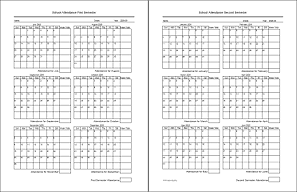
The 2-page attendance form can keep attendance records for one student. If you prefer an attendance calendar that keeps records for several children, please see Attendance H. Each page is designed to keep records for one semester. Record attendance totals for each week, each month, and each semester. The 2-page attendance files are available starting in the months: July, August, and August with two Januaries.
August - 2 Januaries (Aug-Jan-Jan) would be the one that I would have needed in the past. Our semesters typically ran from August to December and then from January through May. Sometimes the 1st semester spilled into January and sometimes the 2nd semester spilled into June. (This file is currently available through a subscription.)

2-Page Dated Attendance Files updated for 2023, DY
3-Page Attendance Calendar - Colonial Planner
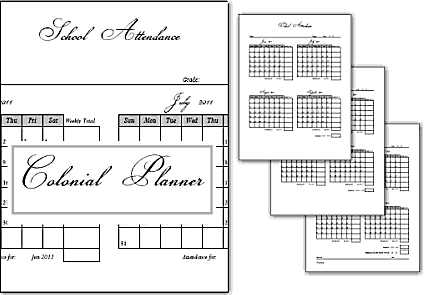
- The 3-Page Attendance Calendar is designed for one child. If you prefer an attendance calendar that keeps records for several children, please see Attendance H.
- Each page in the file has four months. You are welcome to print select pages from the files in order to get the starting month that you need for each page (if it exists).
- Of course, you will use only the months that you need.
- Boxes are included to enter weekly and monthly attendance totals.
- Less useful are the boxes for 4-month totals, but they are included anyway.
- This calendar is from the set Colonial Planner. Colonial Planner is a set that included both homeschool, household forms, a dated journal, and other calendars.
3-Page Attendance Files updated for the year 2023,
Donna Young
Attendance H
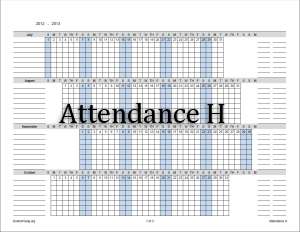
Attendance H is an attendance calendar that prints horizontally (landscape). Attendance H allows you to count attendance for more than one child. The calendars are available for seven children (3 pages), four children (2 pages), and two children (1 page). These numbers of children were chosen not because I think the numbers are common, but because the ruled lines for each child fit nicely on a certain amount of pages.
The lines on the right side of the calendar can be used for anything that you deem useful. I would use one of the columns for monthly totals.
The Files for Attendance H
All of the calendars begin in July.
Attendance H Files updated for the year 2023,
Donna Young
180, 200 Days Attendance Form
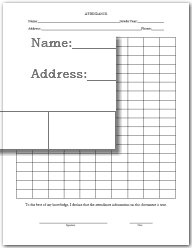
This form is very basic. Simply write the date in each square. Each row has 10 squares. There are two forms, one with 180 squares and one with 200 squares. The 200 Days form has numbers 1-200 to the side of each row in increments of 10.

Ruled Calendar with "Student Attendance" Header
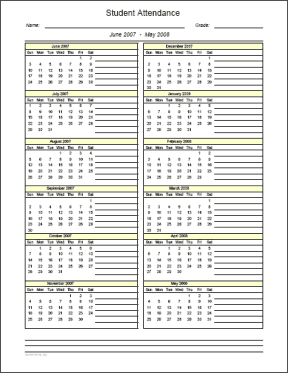
This is a ruled calendar. To see other ruled calendars without the "Student Attendance" Header, see the links listed below.
Files for Ruled "Student Attendance" Calendar
Ruled Student Attendance Calendar Files updated for the year 2023,
Donna Young
V Planner and Attendance

V Planner is part of YoungMinds** and REQUIRES Microsoft Excel in order to be fully functional.
In the V Planner spreadsheet, attendance is marked on the Days worksheet where it maintains a running total. Attendance totals are reported on two printable worksheets- RC# and Transcript#. You may view screenshots below.
Screenshots
- See screenshot of V Planner's Days worksheet where the school calendar is made and attendance is marked.
- See screenshot of RC# (Report Card) where attendance is totaled per term and in all.
- See screenshot of the One-Year Transcript where attendance is reported per semester and in all.
**YoungMinds is a premium version of DonnaYoung.org and is accessed with a yearly subscription.
Other Ruled Calendars
More Available Years
If you need additional future years, up to 2 additional years, of the dated attendance calendars, then subscribe to YoungMinds.
Hello Visitor!
I am currently working on this website to add to its ginormousness. Thank you for visiting, and please subscribe yearly to access my many printable files! Donna Young
May 13, 2021


 Subscribe to DonnaYoung.org or YoungMinds
 Portfolio X
 RSS Feed