Keeping Records of Grades
Homeschool Record Keeping - Score Averages and Grades
Keeping records of scores and grade averages is a part of required homeschooling record keeping for some. For those who need or want to keep records of scores and grade averages, I have added to donnayoung.org printable grade record forms.
XLS Graders
Grades & Attendance
V Planner at YoungMinds
XLS 10-Subject Grader
XLS Keyed Grade Book
Lab WU: Lab Write Up Grader
If you have a spreadsheet program such as Excel, please be sure to also look at my XLS graders. The XLS graders do the calculations for you. Grades and Attendance. I designed grades and attendance especially for those homeschoolers, like myself, who have to keep track of grades and attendance.
On This Page
Ten Subject Grade Form |
Single Subject Grade Form
Saxon 7/6 and Algebra Grade Form |
Report Card / Progress Report
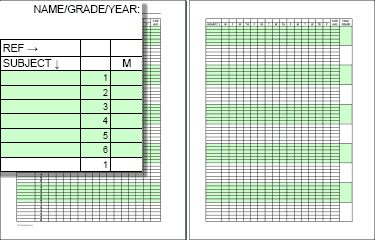
Ten Subject Grade Form
- Can have reference keys, but not keyed to planners
- For one child
- For up to 10 subjects
- 180 score placement cells for each subject
- Score averages may be noted every 3 weeks (the yellow cells)
- Each subject has 6 rows
- Each row equals, or can equal, 6 weeks of school
- The file is available is two colors - see links for descriptions
- The file prints on two sheets of paper
- This style is also available in a functioning XLS
- Related -
 How to Use XLS 10
FILES - these files were updated on October 14, 2013 by DY
 White and Yellow- 10 Subject Grade Form
Green, White, and Yellow- 10 Subject Grade Form
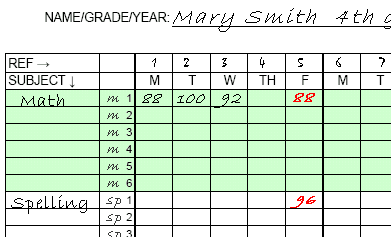
The image below shows a close-up of the form. This is a suggestion of how to use the form. Lines 1-6 are for ONE subject. There are 10 rows of these groups of numbered lines. The subjects are written again on the second page of the form.
REFERENCING THE GRADES: As shown in the image below, the first subject is Math. Notice that the letter "m" has been written next to each number and numbers have been written across the top. These marks or keys are for referencing grades. Example... the red grades are in: m1-5 and sp1-5. The purpose of referencing grades is that (if) you need to make a note of the source of the grade.
Single Subject Grade Form
This form is available in both Roman Keyed and Alpha Keyed
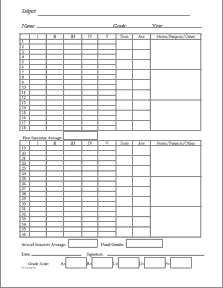
This form is meant for one single subject per school year per child. Form is broken into semesters and grades can be averaged every two weeks, each semester, and yearly. At the bottom of the form is a space for the grade scale.
5 Columns (64 KB) Roman Keyed
 5 Columns doc (82 KB)
with projects, Roman Keyed
Alpha-Keyed - Related: Homeschool Portfolio Lesson Planner
This form has space for 6 notes/projects/other as well as tests and daily work. Add the grades in the days which the graded work was done. That means you will leave some of the cells empty.. which is fine.
Roman Keyed - The cells are keyed by week and day. The days are noted with Roman numerals. Example.. the first Monday is I1, the second Monday is I2.
Roman Keyed Planners
Alexia - 4-Page Quarterly Planner - | PDF | DOC | RTF | ODT | (doc, rtf, & odt formats require a font - see | Alexia | for more details)
Garamond - 4-Page Quarterly Planner pdf | doc | rtf
Garamond - 2-Page Semester Planner -- 5 columns -- pdf | doc | rtf
To coordinate with a weekly planner, you will have to write in the key.
Alpha Keyed means the column headers contain letters and the row headers contain numbers. A letter and a number can be paired to "map" a block in the planner. For instance, A1 is the first block in the planner. A2 is the first block in the second row. E2 is the last block in the second row. Related: Homeschool Portfolio Lesson Planner
Saxon Math Grade Forms
The Requested Saxon Math Grade recording Forms:
based on the older text books
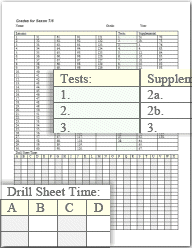
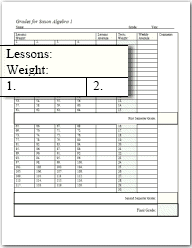
Grade Card, also called Report Card
The report card is described below in the PDF versions.
DOC Report Card · RTF Report Card
Grade Card - PDF Version
This is a basic fill-in-the-blank report card that uses six 6-week periods. Test print on scrap paper and if it they print correctly, print on card stock. Print side one then turn the card over and print side two.
Side One (front and back of card)
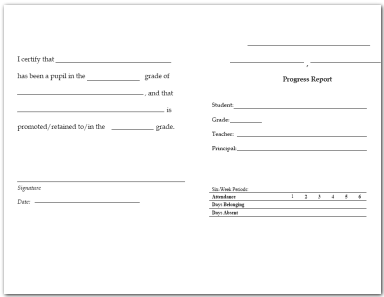
This is Side One, which is the front and back of the grade card.
Side Two (inside of card)
Choose Side Two based on the grading scale.
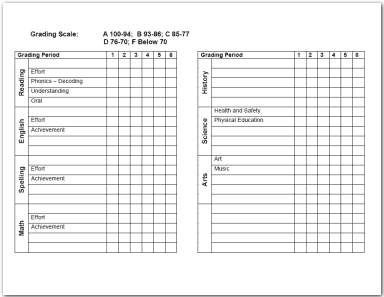
Side
Two
Grading Scale: A=100-94; B=93-86; C=85-77; D=76-70; F=below 70
Side
Two
Grading Scale: A=100-90; B=89-80; C=79-70; D=69-60; F=below 60
Hello Visitor!
I am currently working on this website to add to its ginormousness. Thank you for visiting, and please subscribe yearly to access my many printable files! Donna Young
May 13, 2021
 Jensen's Format Writing
 AOP LifePac Electives Art Plan
 Coloring Shapes
 Member's Login
 RSS Feed