2-Page Block Calendars
Print these files to refill your full-sized household planner or homeschool planner. They are rather plain so you may want to print the files on paper which has background designs and colors. You can make your own special background paper in a word processor.
Donna Young
Dated Block Household Planner
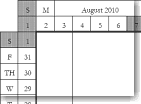
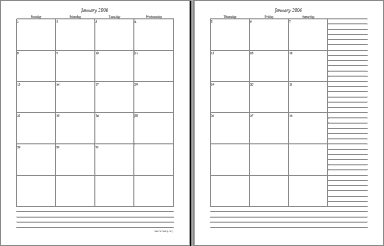 I suppose this planner style could be called classic. Each month has a block for every day and on the right side of page two is a ruled area for a list. At the bottom of both pages is another ruled area. Each month is in a separate file and must be printed that way. In this style, I do not have the entire year in one file.
How to use: Print on the paper of your choice [decorated or plain]. Place the printed pages in a binder. Use it.
Back to Back Printing: First—Do not print the same month back to back on one sheet of paper. Each month requires two sheets of paper. Page one of the following month can be printed on the back of page two of the previous month. Back to back printing is okay as long as the paper is thick enough. 32lb. paper is thick enough; 28lb might be; 20lb isn't and 24lb probably isn't.
The List: If your list seems to repeat every month, the Sans List Planner [below] might work better for you if you are familiar with reloading printed paper in your printer and if your word processor will open DOC files.
 This style is available in XLS and XLSX formats with a subscription to YoungMinds.
Sans-List Planner - Block Calendar
This calendar takes more work if one customizes page 2 with the word file.This block planner is the same as the planner above except the list is removed from the side and the date is removed from the top of page two. The list and header were removed from the pdf so that you may customize page 2 of each month with the provided word [doc] file.
To clarify - The Calendar is a PDF, the List is a DOC -The two files are to be printed on the same sheets of paper after the DOC is edited to suit. The doc is to be printed on page TWO of the two-page calendar.
San-List Page Two Template:  The List, Header, and Background - DOC - see instructions on pages listed below.
1. Edit this doc file, enter a header, add items to the list, make the lists longer to suit your purposes with the tab key. Make sure not to create a second page in the doc file while editing. This file should use one sheet of paper.
2. Reload page two of the correct month (if month-specific) from the Sans-List Planner and print the edited doc over it.
3. Month-Specific - If your doc file is month-specific, example-you've added birthdays to the list, then save the file with the month's name to use again next year (if you think you will use it again). Keep the file open, remove the non-repeating content from the lists, and save the file with a new name.
MSWord Instructions for the San-List DOC Template
Changing the Background Picture | Changing the Header | Changing the List
Undated 2-Page Monthly Block Planner
This block planner has no dates or months. Use these if you do not mind filling in the dates and months.
Suggestion: Print one copy of page 2. Fill in reoccurring items such as bills in the side list. Use a copy machine to make copies for the rest of the year.
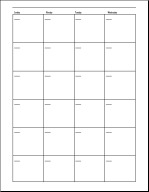
Page One
Has Sundays, Mondays, Tuesdays, and Wednesdays
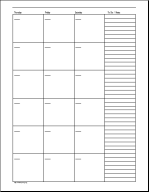
Page Two
Has Thursdays, Fridays, and Saturdays, and a list column
Other Ways to Keep Track
MS Outlook
The calendar in Microsoft Outlook (or a similar software), if you have it, can be set up for appointments and repeating events such as bills. To see the reminders, open Outlook. This works well if you open Outlook every morning.
Online Calendar
If you have a yahoo or gmail email address then you can use their calendar to keep track of appointments and reoccurring reminders such as paying bills. The calendar can be set to email reminders to you at any email address that you choose, additionally, the calendar might be displayed on your home page provided there is a suitable add-on or widget. Google provides a syncing service for android devices.
Cell Phone or other Small Devices
Handheld devices such as PDA's, tablets, and some cell phones can be used to keep track of events.
Use It
Whatever your system, whether it is handwritten or electronic, use it. The mere existence of a system will not remind you to return your library books if you have not placed the reminder in your system.
 Art - The Evaluation Assignment
 While getting the site-cd updated I noticed the super-nifty "Surrounded by a Calendar" row planners
 Folded Gift Bag
 Member's Login
 RSS Feed