How to Unprotect and Protect a Sheet
How do I unprotect a worksheet so I can make changes?
The worksheets that can be unprotected are the ones shown in white:

Unprotect Sheet
Tools > Protection > Unprotect Sheet.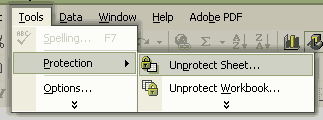
Protect Sheet
Tools > Protection > Protect Sheet.This window will appear:
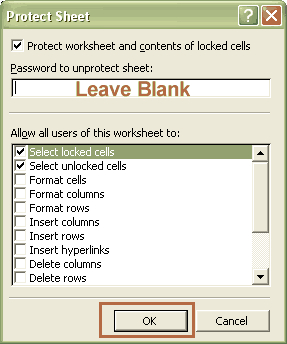
Leave the password field blank unless you just want to password protect
it. If you do password protect it, be certain to remember the password.
Help Pages
Set Up: Quick Start Guide - Information Tab |
Subject Tabs - Adjusting the Grade Weight |
Subject Tabs - Credits |
Set up Your Grade Scale |
Enter Attendance - Calendar Tab |
How to Change the Date on the G&A Calendar |
FAQs: FAQs - Frequently Asked Questions |
I can't see the Tabs: Minimized vs Maximized |
Print Preview and Printing |
Timing and Placing the Scores |
How to Unprotect and Protect a Sheet |
Not Using the Grade Weight |
Year-Round Schooling Changes - Change number of months in school year. |
Year-Round Schooling Changes - Changing the Semester in Print
Hello Visitor!
I am currently working on this website to add to its ginormousness. Thank you for visiting, and please subscribe yearly to access my many printable files! Donna Young
May 13, 2021


 Calendars
 Member's Login
 RSS Feed