
I have been asked many times, “Can I type on the PDF forms?” The answer is yes, but only if the pdf file is made to be typed on. Today’s update is all about seven new PDF forms which can be typed on. The forms are scattered about in the Homeschool Forms section of DonnaYoung.org. For your convenience, here is a list of pages where you can find the typeable pdf forms.
Adobe READER will (might) not save what you type! The typeable pdf’s are meant to be printed. Do not consider using the typeable pdf’s as a running document UNLESS you have Adobe Acrobat.
 Class Schedule: Lesson Planners
- Weekly Log: LessonPlanners
- Course of Study: Course of Study
- Class Schedule: Edwardian Ruled Weekly Planner
The next file is a basic log or a journal. It contains 3 fields, a title field, a subtitle field, and the large field for the body. It is basically blank.
- Blank Log: Journals
The next two type-able PDF’s are another type of log. All options are open to you with these two logs. Typically they were used as a field trip log in the original version, however, I removed the header. These logs can be used for any type of record which will work with the table arrangement on these forms. Here is an image of the 2-column log:
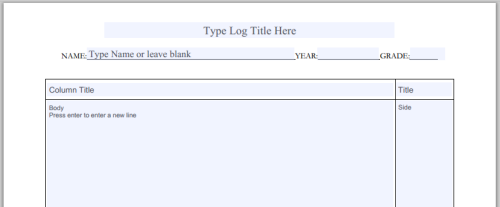
- 2-Column Log and 2-x_Column Log: Outside Activities
– These files was previously removed from DonnaYoung.org, but I brought them back.
 Lastly, at Homeschool High School Diploma Forms you will find a couple of typeable high school diploma pdf files.
This page was updated by Donna Young on May 31, 2014.



Very nice. 🙂
Oh, forgot to say that I love your forms. 😀
Donna, you are my hero!
For some reason I was given a message that I couldn’t save these w/any changes and needed to print them out and write on them. ❓
Elaine, it is probably best to right-click the file and save them that way. OR, if you updated your youngminds last year, follow the update link and download them from that. See my comment below for more details.
I am going to come back tomorrow and see if I can save these…..Thank You Donna…..I am still looking for easter eggs by the way….I have found a few….just not as many as I’m sure you have out there…..:lol:
🙂 I don’t even remember where they all are anymore.
Ginger open the YoungMinds index page, the one with the two doors, click on the Updates link and follow the link to dy from there. The writable pdf’s are in the latest youngminds update. 🙂
Thanks Donna, I’ll try that.
Donna,
Have I ever told you how much I love you? No, well than consider it said. I so appreciate you sharing type-able forms with us. I hate writing now that I write all the time in college.
I love your typeable pdfs, Donna and my oldest son really appreciates them, too.
I have to tell you how much I appreciate all the work you’ve put into the forms and scheduling on your site. I’ve used so many of them, and have referred countless other moms… every time I go hunting, I find something I never noticed before. One of these days I’ll have to order your cd! (or get a friend in the states to do so for me!)
Take care, and keep up the good work!
Donna,
You are such a wonderful person, caring and sharing your wealth of knowledge like you do!! You are a blessing to all of us dis-organized moms … I know I proudly show my “Donna Young” organized system to every knew homeschooling mom I come across. I am awaiting the new YoungMinds cd with great anticipation!!! I had put off and put off ordering it … because your website was always there for me to snag whatever worksheets I needed!!
Thanks … really, a truly heartfelt thanks … you are such a blessing!!!
🙂
Hello Donna!! This is my first visit to your site. I’m soooooo glad I stumbled upon it. It’s soooo awesome & very insightful. Thank you for taking the time for those of us that do homeschool. Thank you, K————
Hi Amanda,
Thank you for the heads up. I will look into it. 🙂
Donna, you are the best. Thank you never seems like enough.
Teresa
There just isn’t enough I can say to thank you for all the work you have done to help organize me, Donna. My children will thank you also when they see how much school can be done in a shorter amount of time if we are organized.
Hello Miss Donna! I hope this finds you doing well today. This study would be great to do. I have been taking pictures of the same trees in the same spot for a few months now. I was doing it weekly, now I’m doing it monthly. It’s neat to see the changes.
Have a wonderful rest of your day, Donna. , Robin
good