
Capture Images of a Specimen through a Microscope
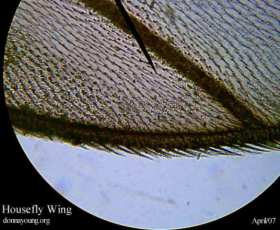 This is an addendum to Aphids & Crataegus. A couple of days ago I came across an unfortunate housefly. I retrieved the fly with tweezers so that I could have a closer look at it with my microscope. It was at that time that I thought others might like to know how to take pictures of specimens in a microscope.
There are at least two ways to take a picture of a specimen through a microscope.
- Purchase a digital microscope that has a camera or a nice microscope that can have a camera attached to it.
- Use a nice microscope and a decent digital camera.
The method for taking pictures with this combination is described below.
Camera
I would venture to guess that most of us have a digital camera. I have one and it is not a good one, it is old and it won’t accept batteries any more, but it still works if I plug it in. It has the macro setting that I use for taking microscope pictures.
Microscope
The microscope that I am about to describe is the minimum microscope that you should purchase for homeschooling. It is suitable for grades up to 12 and it costs between $160 and $220 depending on what you select.
- Minimum: 4x, 10x, and 40x objectives for 40, 100, and 400 magnification
- Fine adjustment knob
- Illumination either by bulb or reflection
There are more qualities to look for and instead of going over all of them, I will link the microscope that I use: National Optical Microscope #131
How to Take the Pictures
Once you have your good microscope and decent camera, it is just a matter of aiming the camera just right. The steps below assume that you have the specimen in the microscope and the microscope focused. Also, the light source must be present. If you need additional light, use a small adjustable light source such as a desk lamp.
Here is how in steps:
- Check that your camera is set to a close-up setting or macro.
- Look through the camera lens or use the viewing window (I prefer the window.)
- Aim the camera so that the light from the microscope is always in view.
- Bring the camera closer to the microscope until it is touching it or almost touching it and all the while, Keep the Light in View!
- By this time, the specimen ought to show in your camera lens or window, snap the picture.
- If the image is not right, try again. If the camera focus is not right, refocus.
- Download the images to your computer.
Iris Images
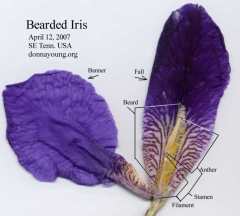
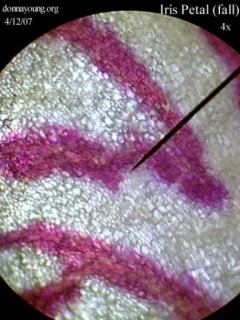
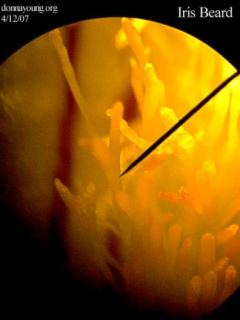
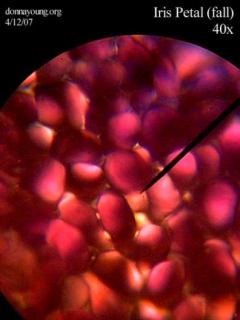
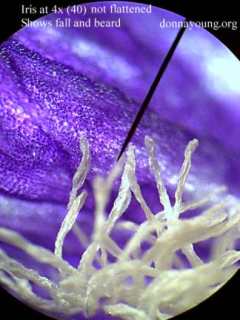
April 12, 2007, I picked a bearded iris bloom on my way back from the mailbox. I removed a fall (a lower petal) and a banner petal (upright petal that is attached to base of fall). There was a stamen sandwiched between the fall and banner petals. I detached the banner from the fall and scanned them. I am telling you this so you will know what parts of the iris are shown to you in the microscope images below.
Some of my iris images from April 12, 2007. Click on the image to open a gallery. Touch the right side of the images to or use the right arrow key to move through the photographs.




Wow, Donna, I’ve never had a science lesson like that. I think that if you’d been teaching my life science classes I would have enjoyed them more. 😆
Nice instructions. Isn’t this fun! I love taking pictures with the microscope. 🙂
thanks for the info. I just don’t have a microscope yet. It is on my list. I will probably buy it when we get to that point in Sonlight’s science.
Thank you Renae. 😀
I did need this time, Michiellee. I sewed most of the week, but that was relaxing since I enjoy sewing. 🙂
That is incredible!! It is so beautiful Donna….:)
🙂 Holly and I were going over the different things the center looked like. Tips of shoes were on the list.
You can be behind Applie, however; it is too late, John has seen it and he likes it!
wow! Nice tut. I will try this soon.